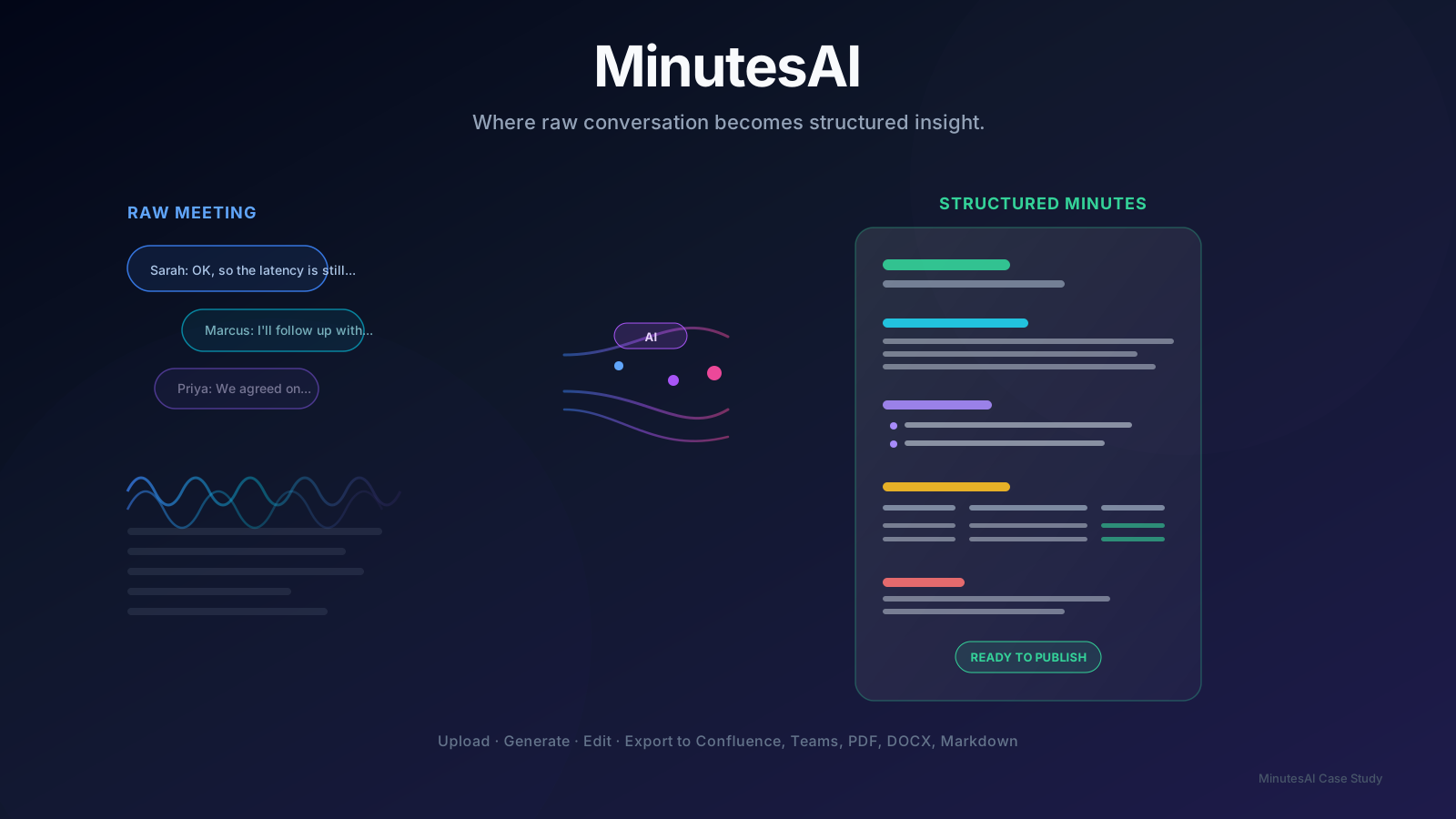
Innovation maturity
Current stage: MVP
- 01
Idea
Completed stage - 02
Research
Completed stage - 03
Prototype
Completed stage - 04
MVP
Current stage - 05
Production
Future stage - 06
Scale
Future stage
Executive Summary
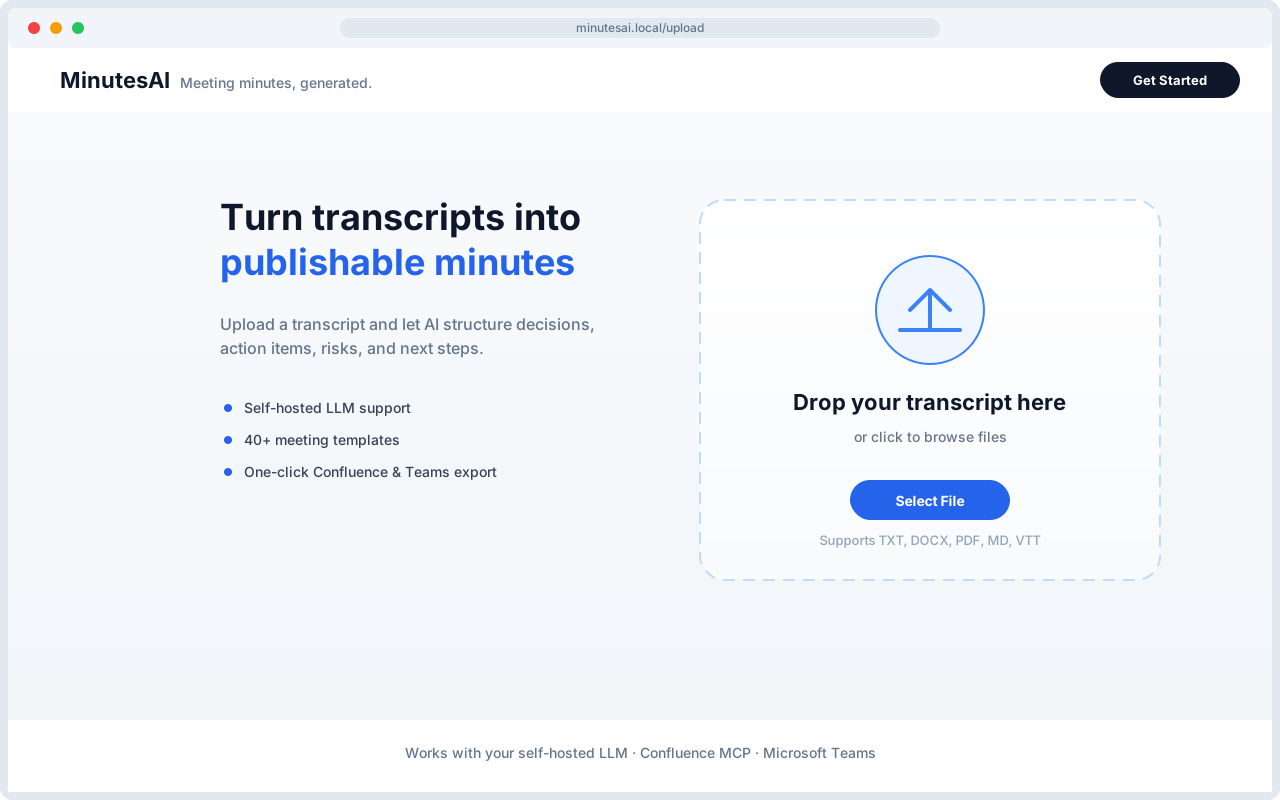
MinutesAI transforms raw meeting transcripts into polished, publishable Meeting Minutes using a self-hosted, OpenAI-compatible LLM. The workflow is intentionally linear: upload a transcript, classify the meeting type, generate structured minutes, edit the result, and export to Markdown, DOCX, PDF, Microsoft Teams rich-text clipboard, or Confluence.
The application is built around a small set of clean abstractions: TranscriptParser for file ingestion, TemplateRegistry + MeetingClassifier for prompt targeting, MoMGenerator for LLM orchestration, ExportService for client-side file generation, and a Confluence MCP client for enterprise publishing. State is ephemeral, carried through sessionStorage and server-side env configuration, keeping the architecture stateless and easy to deploy.
Problem Statement
Engineering teams generate hours of recorded or transcribed meeting content every week, but turning those transcripts into usable records is slow, inconsistent, and error-prone:
MinutesAI addresses these by combining deterministic preprocessing, template-aware prompting, and direct publishing into enterprise tools.
- Manual minute-taking is expensive. A TPM or engineer must listen, summarize, extract decisions, and format action items—often repeating the same structure across standups, sprint reviews, architecture reviews, and incident post-mortems.
- Unstructured transcripts are hard to consume. Searching a 40-minute VTT file for "what did we decide about the rollback plan?" is impractical.
- Knowledge disappears into chat threads or private notes. Without a predictable publishing path, decisions and action items fail to reach Confluence, Jira, or Teams where the rest of the organization works.
- Generic summarizers produce generic output. A standup and an architecture review need different sections, tone, and depth; one-size-fits-all prompts miss critical nuance.
- Recurring meetings fragment across pages. Publishing each standup or sprint review as a new Confluence page creates navigation noise and scatters history.
Vision
The vision is to make meeting intelligence a zero-friction, one-click operation for engineering organizations:
"Upload any transcript, get publication-ready minutes structured for the meeting type, and publish them where the team already works—without inventing facts, losing history, or leaking data to third-party SaaS models."
Longer-term, the architecture supports:
The product is deliberately not trying to be a full meeting platform; it is a specialized minutes-generation and publishing pipeline.
- Domain-specific templates for every engineering ritual (Agile, Architecture, DevOps, Security, Incident, Program, Customer).
- Living Confluence pages that accumulate history for recurring meetings rather than fragmenting it.
- Self-hosted LLM compatibility so enterprises can keep transcripts inside their network and VPN.
- Composable export targets (Confluence, Teams, Markdown, DOCX, PDF) driven by a small service layer.
Research
Input Formats and Parsing Strategy
- The team identified five common transcript sources: plain text exports, Microsoft Word meeting notes, PDFs, Markdown, and WebVTT captions from recorded calls.
- Rather than forcing users to convert files, TranscriptParser.ts implements a pluggable parser per format with a shared normalization pass.
Prompt Engineering and Factual Safety
- The LLM prompt is the core IP. Research focused on preventing hallucination while preserving usefulness.
- Explicit "do not invent" rules: attendees, owners, dates, decisions, risks, and action items must come from the transcript.
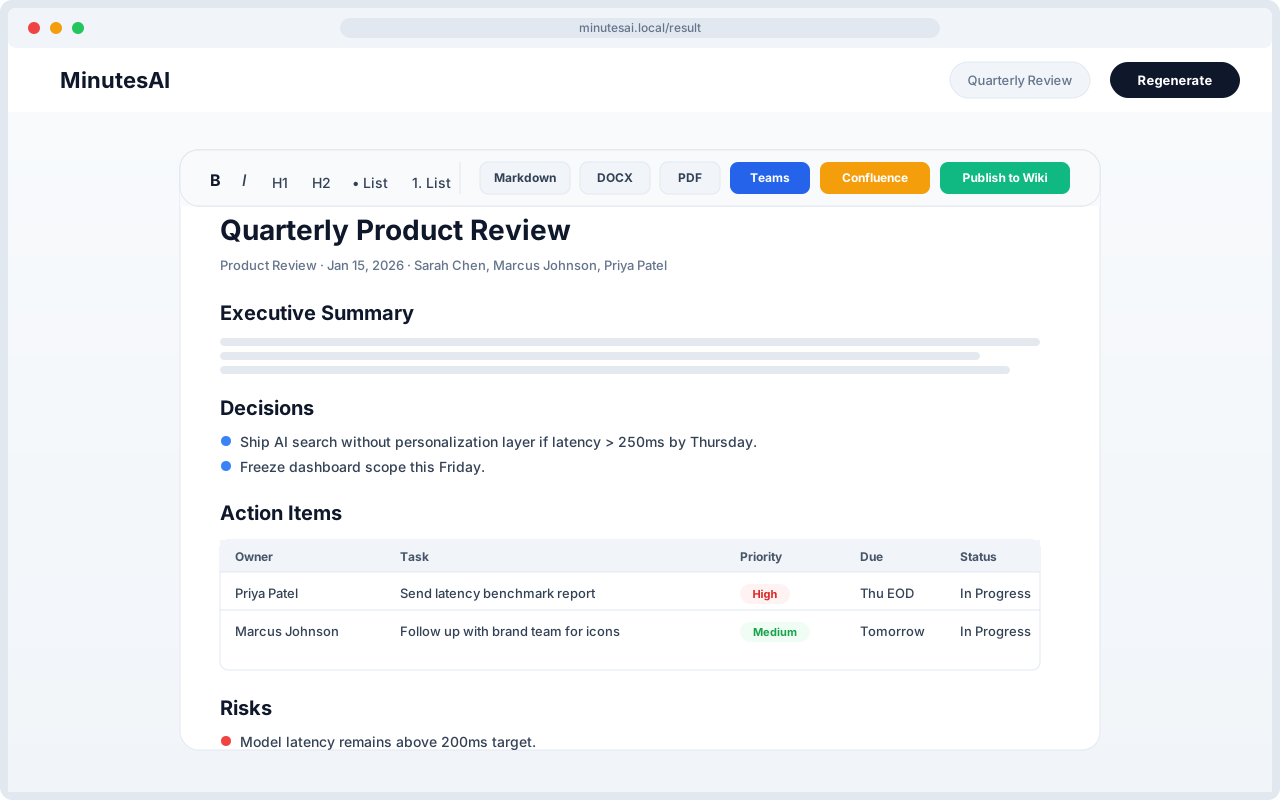
- Sectioned output template: the prompt forces a consistent Markdown structure (Executive Summary, Quick Recap, Decisions, Next Steps, Action Items table, Risks, Blockers, Dependencies, Open Questions, Parking Lot, Follow-ups).
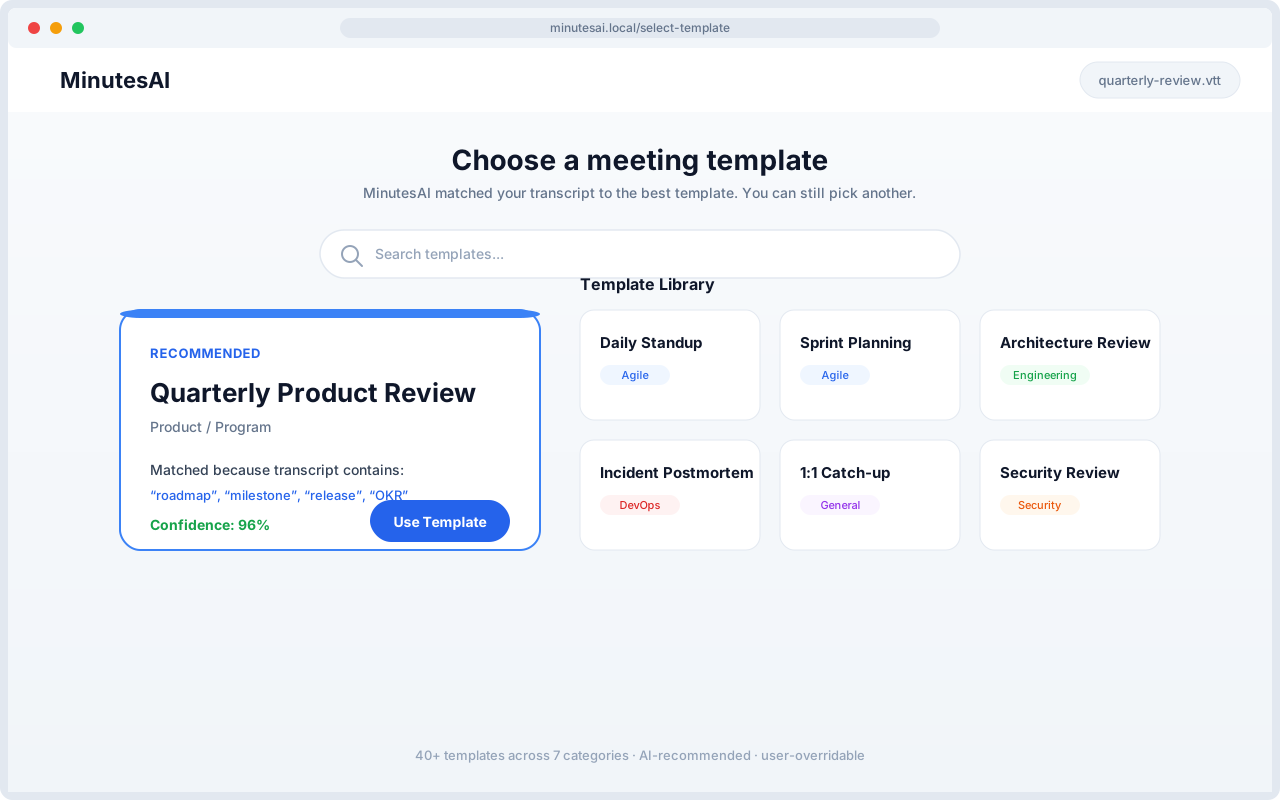
- Template specialization: a registry of 40+ templates injects category-specific focus into the system prompt—Architecture prompts ask for trade-offs, Incident prompts ask for timelines and root cause, Program prompts ask for business impact.
Confluence Publishing Model
- Research into enterprise wikis showed two competing needs: one-off pages for unique meetings and living pages for recurring meetings.
- The PRD explicitly defines a "Meeting History" append model where new meetings are prepended to a durable page, preserving older entries.
Integration Protocol: MCP
- Instead of hand-rolling Confluence REST calls everywhere, the project uses the Model Context Protocol (MCP) via @modelcontextprotocol/sdk.
- The client auto-discovers tool names, supports Streamable-HTTP with SSE fallback, and tolerates custom tool naming through env overrides.
Prototype
This journey validates the prototype's core bets: users want speed, but not at the cost of control. Classification removes friction, streaming builds trust, editing protects accuracy, and append mode keeps recurring meeting history in one place.
- Sarah, an Engineering Program Manager, runs a 45-minute quarterly product review recorded to VTT.
- Upload. She drops the transcript into MinutesAI. The parser cleans cue markers, timestamps, and wrapped speaker lines automatically.
- Match. The classifier recommends the Quarterly Product Review template at 96% confidence based on keywords like "roadmap" and "milestone." Sarah confirms with one click.
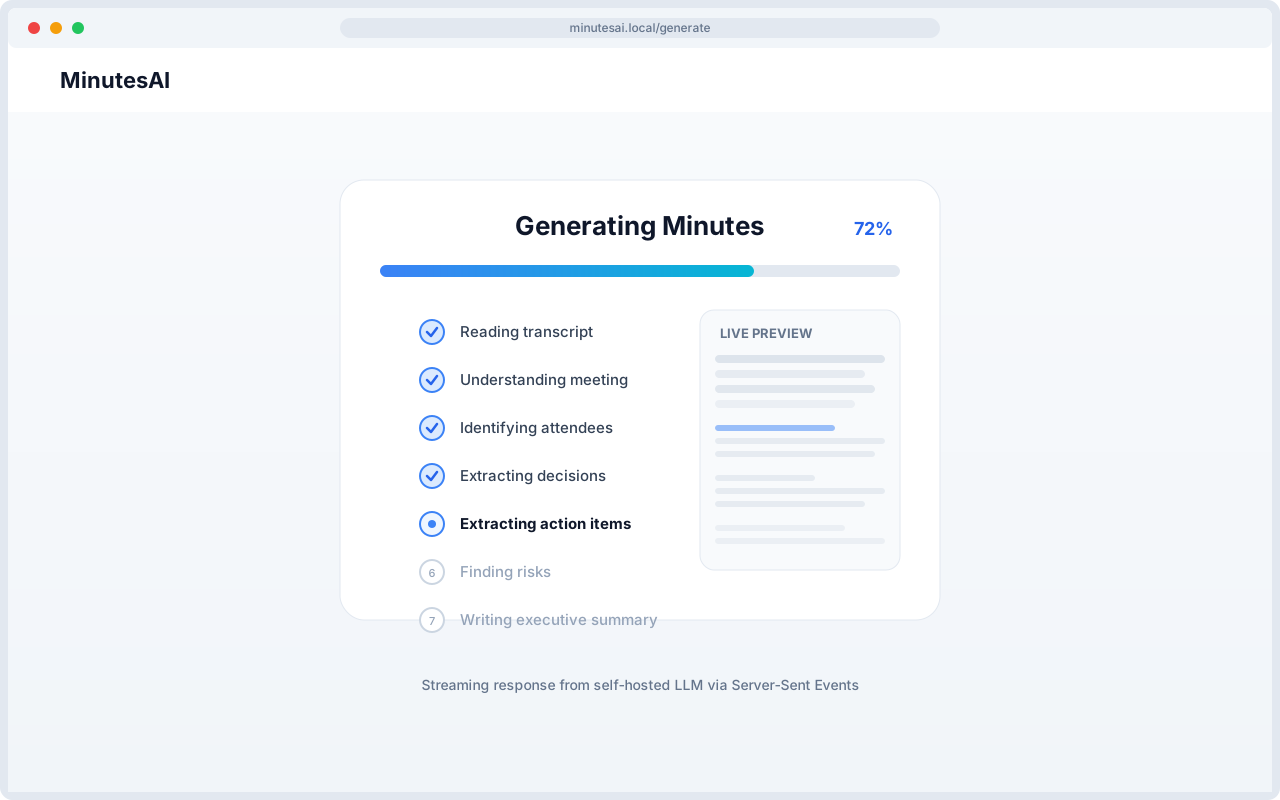
- Generate. The app streams LLM output through eight visible steps. Sarah watches the minutes take shape in real time, with the transcript staying inside the company VPN.
- Edit. The structured minutes open in a TipTap editor. She verifies one attendee name and adjusts an action item wording.
- Publish. She appends the meeting to the existing Confluence living page and copies the executive summary to Microsoft Teams. Total time: under four minutes.
Business Value
- Time Savings: A 45-minute meeting that previously required 15–30 minutes of manual note-taking and formatting can now produce a first-draft minutes document in under a minute, with the reviewer only needing to verify facts.
- Consistency and Findability: Every meeting type uses a predefined section structure. Decisions, action items, risks, and open questions land in predictable locations, making them searchable in Confluence and reproducible across teams.
- Knowledge Retention: The append/living-page model keeps recurring meetings in one place. Newcomers can read the latest entry and scroll back through history without hunting across dozens of pages.
- Enterprise Data Sovereignty: By targeting a self-hosted LLM via CUSTOM_LLM_BASE_URL, transcripts stay inside the corporate network. There is no forced upload to a public cloud AI service.
- Low Operational Overhead: No database to back up, no user directory to sync, no secrets baked into the image. Configuration is entirely env-driven, and the Docker image runs as a non-root user.
- Reduced Tool Friction: Direct publish to Confluence plus one-click "Copy & Open Teams" means minutes reach the channels where work actually happens, increasing the likelihood that action items get acted on.
Lessons Learned
- Human in the loop: AI workflow design must include the human decision points, not only the model interaction.
- Scope guardrails are a feature: Keeping the app laser-focused on Upload → Generate → Edit → Export prevented scope creep and allowed the team to ship a complete, polished tool rather than a half-built platform.
- Prompts are the real product: Investing in the prompt architecture—factual-safety rules, a strict output template, and per-category specialization—paid larger dividends than model tuning. The MOM_SYSTEM_PROMPT is the central quality lever.
- Enterprise wikis need append semantics: The original create-only flow generated page sprawl. The living-page append model, with its durable Meeting History heading and prepended sections, turned Confluence from a dumping ground into a readable historical record.
- MCP abstraction adds robustness: Auto-discovering Confluence MCP tool names and supporting both Streamable-HTTP and SSE made the integration resilient to server differences. Env overrides (CONFLUENCE_MCP_TOOL_*) future-proof the client against tool renames.
Architecture
Human-reviewed meeting intelligence
Meeting artifacts move through structured extraction and review before decisions and actions are distributed.
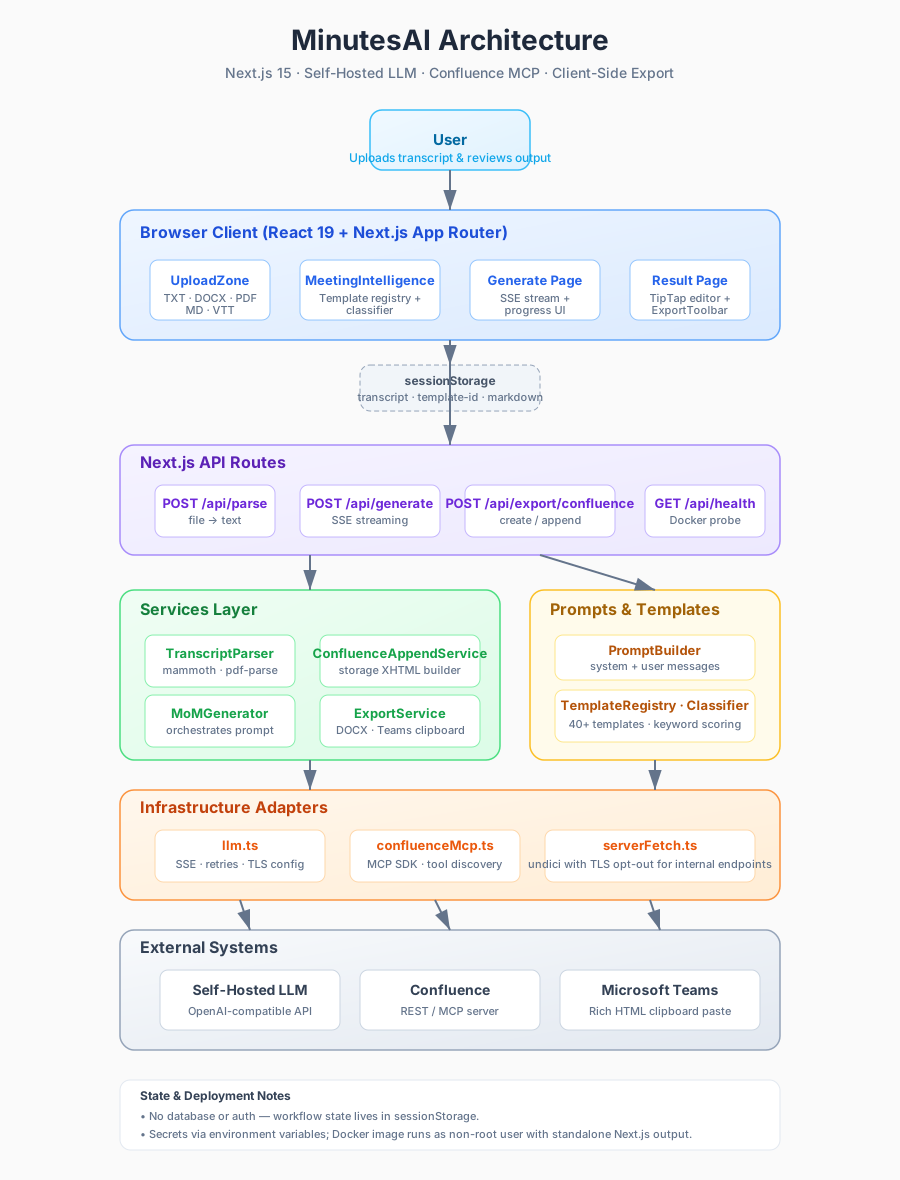
Layer 01
Meeting intake
Upload transcripts in TXT, DOCX, PDF, MD, or VTT formats and normalize them into a common text stream.Layer 02
AI extraction
Use a lightweight classifier and a registry of 40+ templates to target the right prompt for the meeting type.Layer 03
Human review
Let a reviewer correct the generated minutes in a TipTap editor before anything is published.Layer 04
Searchable decisions
Publish to Confluence (new or living pages), copy to Teams, or export to Markdown, DOCX, and PDF.
Roadmap
Learning before commitment.
- 01Completed
Workflow research
Frame the recurring coordination problem and review requirements.
- 02Completed
Reviewable prototype
Validate extraction, correction, and distribution as separate workflow stages.
- 03Completed
MVP
Fully working minimum viable product.
Gallery
Product views
Resources